
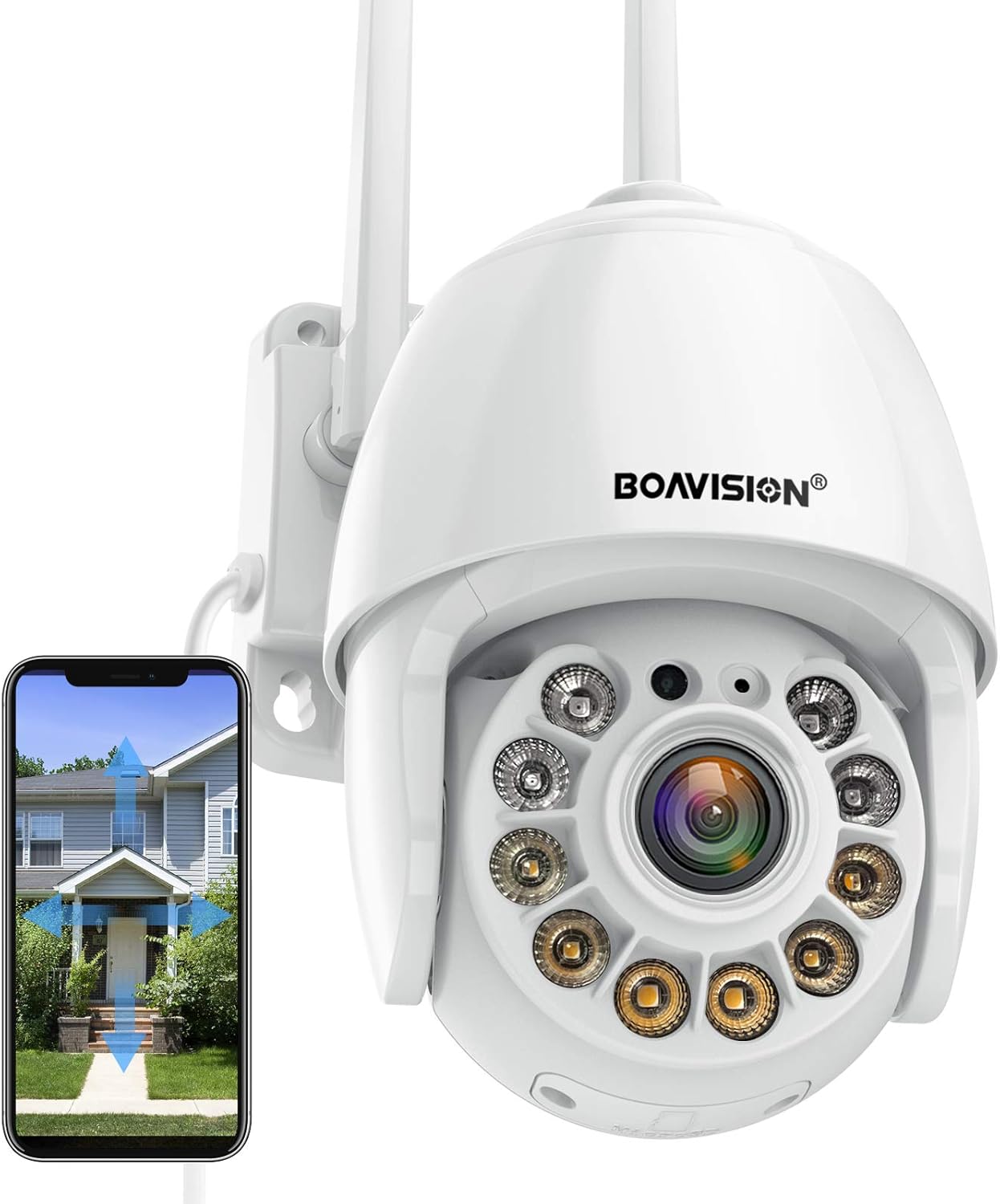


Security Camera Outdoor, Wireless WiFi IP Camera Home Security System 360° View,Motion Detection, auto Tracking,Two Way Talk,HD 1080P pan Tile Full Color Night Vision Boavision : Electronics
- Category: Dome Cameras
- Store: BOAVISION
Share on:
Description
1080P IP Camera has 1920*1080P High Resolution, full HD image for day and night, more details on the picture. It enhances the field of vision at night and covers100FT wide range, ideal for open areas like parking areas, garage, backyard, front yard, etc. Powered by DC12V adapter with 9.8ft power cord ,You can connect the camera to Wi-Fi network. you can setup wifi connection of the camera by AP hot spot or LAN Search with network cable connected to router (Optional), work with 2.4G wifi only (Does not support 5G) This home security camera system lets you listen in and talk back through the built in speaker and microphone that work directly through your iPhone or Android Mic. Enjoy the convenient communication when you're resting or busying. This camera built-in ultra-long-distance infrared LED and floodlight LED, which can be fully controlled on the mobile phone APP, and can switch between normal/Intelligent/full-color night vision modes simply and quickly. After locking the target, the camera will adjust the pan/tilt rotation automatically,Tracking Moving Objects,Cars,Pets,Human,and push alerts via email or notifications to your smartphones (iOS, Android). This Camera pushes real-time & accurate motion alerts,flood light will be ON when it detects a motion ,Sound Alarm with Siren function, turn on in settinge page to active Sound Alarm and Turn on Intelligent mode. Althrough we can get a pushed message on phone when detect motion, but it also allows you to setup Email Alert (send email with a picture) and upload motion photos/videos to FTP server Insert a SD card, it is a comlete remote home secuirty system, recording 24*7 videos or only motion events, and easily playback on phone app (support 8~128G micro SD card, card is not included) All-weather outodor security camera could work in any weather status, sunny, rainy, snow, -4~140°F,Our Camera has been tested to endure extreme weather conditions and will brave the outdoors like an iron penguin. Rain, hail, storm, snow, and sunshine This camera allows you to connect most famous NVR , NAS and 3rd Party camera software, like Blue iris, ispy, Tinycam, IPCamViewer, Synology, QNAP, 2K/4K NVR, etc Supports smartphones (iOS, Android), tablets (iPad, Android), PC(Mac OS, Windows). This is the most convenient way to watch from anywhere, anytime. The wireless wifi camera supports a maximum of 64 Users to live stream at the same time. Easy Share the wifi camera with your family members for a happy moment or take care of kids or elders anywhere. VERY IMPORTANT FAQS: Q:Do you mean I don’t need any power cables to get it work as you said it is wireless camera? A:“Wireless” means that you can connect the camera to Wi-Fi network. Camera comes with a power cord that needs to be plugged in for use. Q:Can I extend the cable between camera and power adapter ? A:Don't use extension cable from other brand between camera and adapter,or will cause malfunction and damage. Q:I set Wi-Fi network for the camera. However, the camera is disconnected as soon as I unplug network cable. A:The camera does not support special letters (è à ö ...) or symbols (@ # & ...) in Wi-Fi SSID and Wi-Fi password. Please use standard English letters and numbers. At the same time, please check in your router setting and make sure that the encryption of your Wi-Fi is not set to combined algorithm of AES+TKIP, which is not supported by the camera. Q: How to make Floodlight work at night? A: Open camera live view page on phone app, slide left twice at the bottom, tap "Night Vision Mode" icon, you can see "Ordinary", "Color" and "Intelligent". "Ordinary" means only IR LED work, black/white picture at night; "Color" means only Flood Light work, color picture at night, "Intelligent" means Flood Light work when detect motion, otherwise, only IR LED work, please select the best according to your request. Q: How to make Auto Tracking work? A: Open camera live view page on phone app, slide left twice at the bottom, tap "Intelligent Tracking" icon to turn on Auto Tracking function, please note there is a middle speed motor inside, it can not track very fast motion, and the camera will go back to original position after the subjects has left the tracking range. Q: How to turn on Sound Alarm? A: please go to camera settinge page-->Alarm management and notification-->turn on "Motion detection alarm" and "When the alarm is triggered, the device issues a siren" in Action with Alarm. Q: How to save motion events to SD card? A: The camera supports 8~128G micro SD card (sd card is not in the package), insert the card when it is power off, turn on the camera and go to camera settinge page-->Alarm management and notification-->find Action with Alarm, turn on "Alarm recording to SD card " Q: Why I can not find recorded video on my playback? A: Setup the correct time zone for your device Select your Time Zone, and enable Daylight Saving Time, then Click Saving Time Zone for Device. Q: How to playback and download motion videos? A: Tap "Playback/sd card" icon in app home page camera list, you can see the alarm recording or plan recording files, tap to play or download. And you can also go to top Time playback to pay according the time.
Product Overview
We Recommend