


Parblo A640 V2 Drawing Tablet with 8192 Levels Pressure Battery-Free Pen, 6 x4 Inch Pen Tablet Compatible with Android Windows Mac OS for Digital Artworks, Elearning, Remote Working (Black): Computers & Accessories
- Category: Graphics Tablets
- Store: Parblo
Share on:
Description
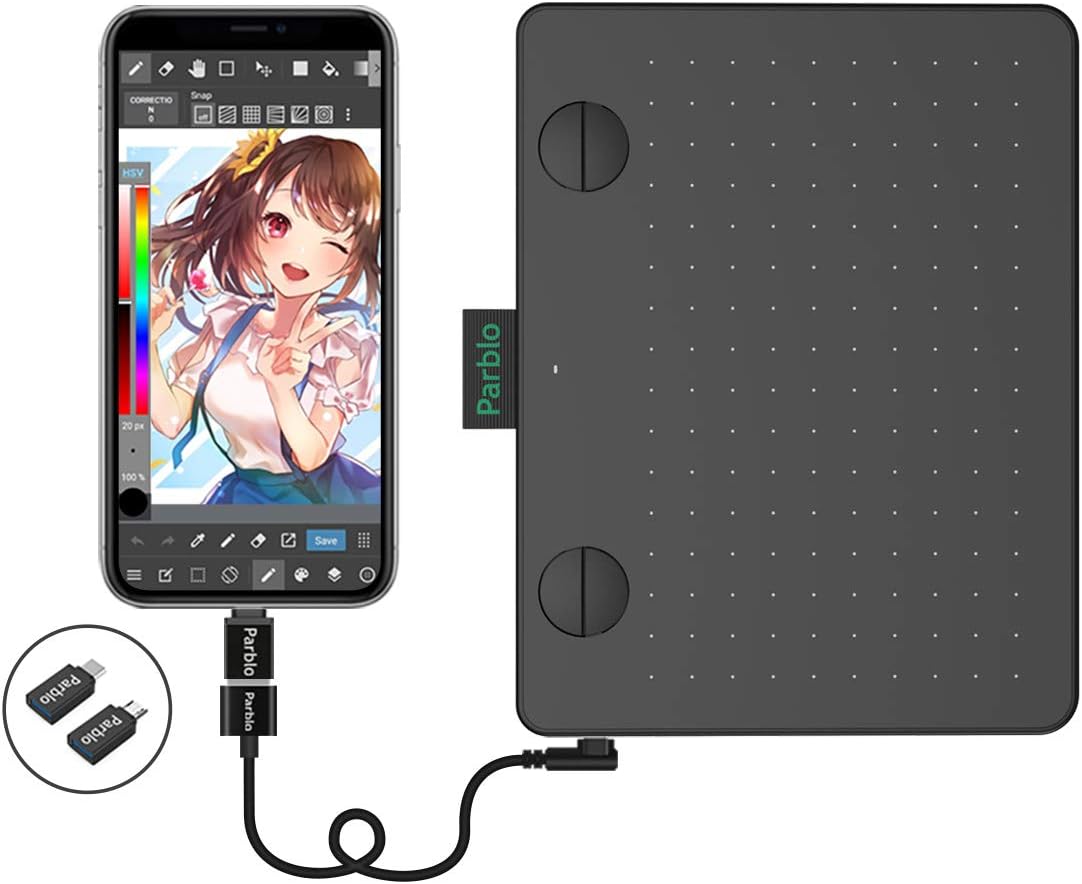
1 The Parblo A640 V2 Drawing Tablet is not a stand-alone product. It needs to be connected with your computer and installed the driver to use. The driver will be regularly updated, so please go to Parblo official web to download the newest driver, and install it on your computer. 2.1 For Windows Users: Please make sure there is no other brand driver on the computer and close all drawing programs or anti-virus programs before installation. (IMPORTANT) Please run as administrator when installing the driver. Find "PenTablet" for windows setting, "PenTabletSetting" for Mac setting 2.2 For Mac Mojave (10.14), Catalina (10.15) Users: Our driver is compatible with Mac OS Mojave (10.14) and Catalina (10.15), please install the newest released driver on your computer. After the driver is installed, click the driver and the following the below instruction to setup. Please click "Open System Preferences", Click "Click the lock to make changes" to unlock it--- For macOS Mojave, in "Accessibility", "Tick "ParbloTabletSetting" and click "Click the lock to make changes" to lock it. For macOS Catalina, in "Accessibility", "Tick "ParbloTabletSetting" and click "Click the lock to make changes" to lock it. The Click "Input Monitoring", add "ParbloTabletSetting" and Then, click "Click the lock to make changes" to lock it. 3 For Android 6.0 or later OS Users: Before connecting the Parblo tablet to your Android phone or tablet, please make sure your Android phone or tablet supports OTG and Android 6.0 or later, and there is no need to install the driver to your Android phone or pads, just plug it in and enjoy it. 3.1 Please make sure it works in a vertical screen mode when the tablet connected to your Android phone or tablet. 3.2 Not all Android devices can support the Parblo A640 V2 tablet. The following Android Phones/Tablets that cannot work properly with our tablets: Nexus 6/ Google; Galaxy S6/ Samsung; Galaxy S7 edge/ Samsung; Galaxy S7/ Samsung; Galaxy Tab S2/ Samsung; Galaxy S8/ Samsung; Galaxy Note 4/ Samsung; Galaxy Note 8/ Samsung; Galaxy Note 9/ Samsung 3.3 If your phone's battery life seems poor or short, the tablet may not work properly. Please ensure your Android device has enough power to run normally. 3.4 Five Useful Drawing And Painting Apps For Android: Autodesk Sketchbook, Adobe Illustrator Draw, Ibis Paint X, Infinite Painter, ArtFlow: Paint Draw Sketchbook. Battery-free Pen with 8192 Pressure Levels This Parblo P05 drawing stylus offers an 8192 pressure level that gives you natural writing and sketching abilities with high accuracy and efficiency. With the battery-free pen no need to worry about the charging problem. The two hotkeys on the pen make your work more efficienclty. Equipped with 4 Customizable Keys Equipped with four customizable keys, you can comfortably zoom up, rotate the canvas, etc. It also can be programmed according to your needs and save up your favorite shortcuts for each of your graphics software. These keys can become your navigator, mouse, in just a few seconds. You can modify your art with the help of these keys. Artworks are Clearer and More Natural This compact tablet has 5080 LPI High-resolution into one inch of the tablet’s drawing surface, which offers a clearer drawing translated from tablet to computer, also brings you a more accurate and natural drawing experience. The report rate speed ups to 266 RPS, which makes you feel like drawing by a pencil. Compatible with Windows/Mac OS and Most Applications Compatible with computers with Operating System is Windows7, 8, 10 OS, or Mac 10.11 later version. Works with most part of the usual and mainstream drawing software, such as Photoshop, SAI, Painter, Illustrator, Medibang, Firealpaca, Clip Studio, Krita, Sketchbook, and other graphics software. Android 6.0 and Later OS Supported Compatible with Android Operating System 6.0 or Later Version. It gives you an easy connection with your phone to the tablet with the OTG connector, it is more convenient and portable. No need to install the driver to your phone or pads, just plug it in and play with it. Please make sure your Android phone, tablet or pad supports OTG and Android 6.0 or later OS, when it connected to this drawing tablet. Disegned for Digital Art Creation and OSU! This multi-function drawing tablet with a slim design and compact size provides you plenty of space to draw. The upgraded functions make it a good choice for art creations, sketching, drawing, painting, graphic design, illustrative, photo editing, E-signatures, document editing, OSU! Game playing, also online education and web conference, etc.
Product Overview
We Recommend



![[4 Bonus Items] Simbans PicassoTab 10 Inch Drawing Tablet and Stylus Pen, 2GB, 32GB, Android 9 Pie, Best Gift for Beginner Graphic Artist Boy, Girl, HDMI, USB, GPS, Bluetooth, WiFi - P92: Computers & Accessories](https://images-na.ssl-images-amazon.com/images/I/913q1toVsTL._AC_SL1500_.jpg)