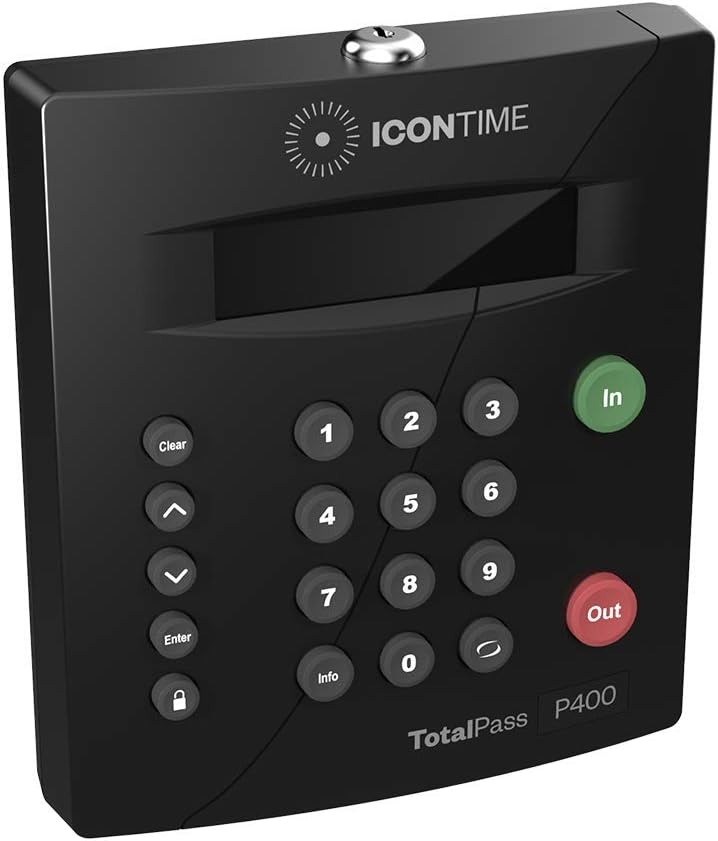
TotalPass P400 Employee Time Clock | Industry First: Manage Timecards via USB, Network, Wi-Fi or Web. No Monthly Fees. : Office Products
- Category: Time Clocks
- Store: Brand: TOTALPASS
Share on:
Description
An Affordable Time Clock That Packs a Powerful Punch No software to install, it's built into the clock No monthly fees Connects to your network via Wi-Fi, Ethernet or USB US-based support team Purchase includes 30 days of free support to get you up and running Multiple entry options: PIN, Proximity Badge (sold separately for the TotalPass P400), or Web punch (sold separately for the TotalPass P400) Export employee hours directly to payroll Manage time and attendance from anywhere Free exports to popular payroll providers: QuickBooks Online, ADP Workforce Now, Paylocity, Paychex Flex & Preview, SurePayroll, & Paycom If you have employees working from home or other remote locations, the TotalPass P400 will allow you to record time using Web Punch. This method adds remote punch capability by using the web browser on your computer, tablet or smartphone. Please note: Web Punch Licenses for the TotalPass P400 model are sold separately at an additional cost. Web Punch is included with the TotalPass P600 model. If you work in the office or location where your automatic time clock resides, our Proximity Badges will allow employees to clock in and out by simply waving the badge over the face of the clock. Please note: Proximity Badges for the TotalPass P400 are sold separately. Proximity Cards are included with the TotalPass P600 model. Your Perfect Payroll Assistant Automatically detects your available Wi-Fi networks Simple setup means you’re and up and running fast Intuitive user interface makes it easy for employees to clock in and out Eliminates gathering timesheets No more transcription errors Perfect accuracy on every punch Export time and attendance data directly to payroll Multiple entry options: PIN, RFID Proximity Badges (sold separately) Web Punch Licenses (sold separately) Works for up to 25 employees (expandable to 250) Advanced Features, Benefit Tracking, and Email Alerts can be added Our US-based team is ready to help get you up and running and the first 30 days of support are included with your clock. We're here if you need help with your time clock including: Connecting the time clock to your network via USB, Network or Wi-Fi Setting up your time clock Selecting and adding optional features to your time clock like Web Punch or Proximity Cards Repairs and warranties Advanced Features allow you to: Track employee productivity by Tips, Job Numbers, or Piece Counts Create “Notes by punch” Use up to 99 Department Codes (for Payroll export) Track Employee Assignments Customize Supervisor Login, Permissions and Employee Assignments Customize fields for Labor Distribution Reports Customize Rules & Settings for: • Revision Zones • OT1 & OT2 Multipliers • Consecutive Day Setting • Overtime • Benefit Accruals Generate Accrual Summary Reports Filter ’Create Report’ by Non-work Hours (Vacation, Sick, Personal) Create Email Alerts for: High/Low/ Max Hours, Consecutive Overtime Daily Overtime Weekly Overtime Software Updates Backup Reminders Punch Notifications Automatic Email Backups Data is Secure with SSL Encryption TotalPass P400 Time Clock 15 ft. Ethernet Cable 15 ft. USB Cable Locking Mounting Plate with 2 Keys Power Supply Quick Start Guide
Product Overview
We Recommend