

La Crosse Technology 308-1414B-INT, Black 308-1414B Wireless Atomic Digital Color Forecast Station with Alerts : Patio, Lawn & Garden
- Category: Weather Stations
- Store: La Crosse Technology
Share on:
Description
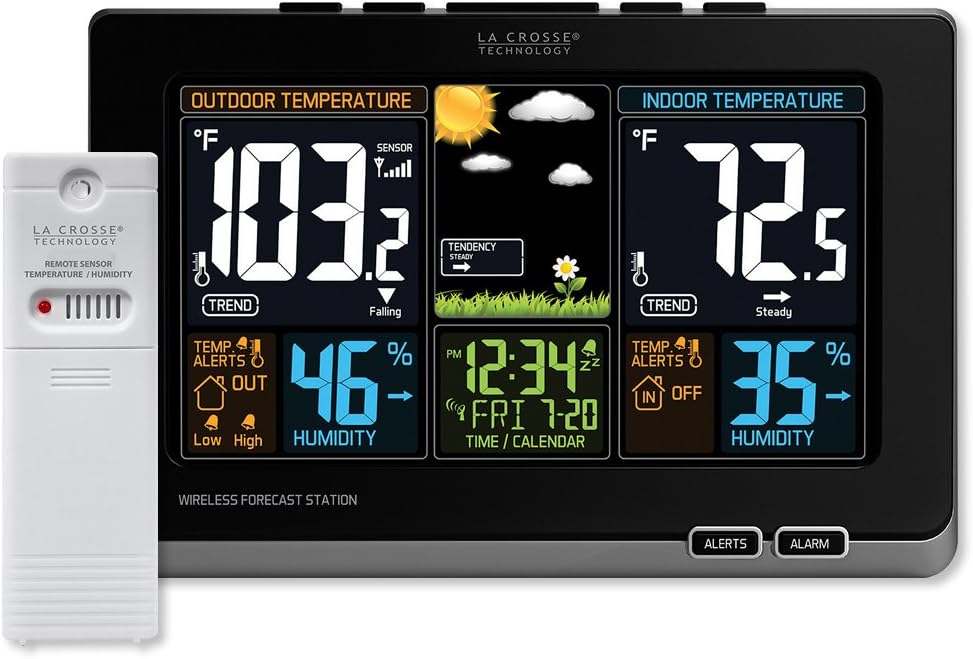
La Crosse Technology introduces a Wireless Color Weather Station with precise, real-time backyard weather. Animated color forecasts with trends react to changing barometric pressure. Monitor in/out temperature trends with high and low alert settings. Measure in/out temperature and humidity with daily min/max records--all on one easy-to-read color display with adjustable brightness. Constant Back light (requires included 5v power cord) Weather Resistant (not waterproof) transmitting Wireless Temperature/Humidity Sensor Transmission range over 330 ft (distance/resistance will reduce signal range) Vibrant color LCD with Intelligent weather (allow 3 to 4 weeks for proper calibration) which ensures the most accurate forecasting to your location Animated Forecast background icons: sunny, partly sunny, cloudy, rainy, stormy, and snowy Displays Indoor temperature (F/C adjustable) and humidity (%RH) Indicator icons: temperature & humidity trend arrows, Atomic reception, low battery Temperature Alerts for both Indoor & Outdoor Indoor Temperature Range: 32 F to 122 F (0 C to 50 C) Heat index/Dew Point Wireless transmit from over 330 ft range (obstructions, such as: walls, glass and resistance, such as: trees, bushes can reduce range) Weather resistance to light moisture, but not direct rainfall and heavy precipitation Proper sensor location: Northside of home, Shaded area protected from direct sun/rain but well-ventilated for accuracy Wireless Outdoor Temperature Range: -40 F to 140 F (-40 C to 60 C) Sensor requires 2 AA batteries (not included) Atomic Self set time & date Automatic Daylight savings time resets (on/off option) Seven time zone settings (AST, EST, CST, MST, PST, AKT, and HAT) Adjustable backlight settings (HI/LOW/OFF) (requires power cord) 12/24 hour time display Time alarm with 10 minute snooze Wall hanging display or base stand Included 5V power cord (optional, battery back up requires 3 AAA, not included) Full color display gives you current temperatures & humidity, with a future forecast whether it could be sunny or rainy to snowy. Features accurate, self-set atomic time & date with automatic DST updates. Records min/max values and alerts you of extreme temperatures. Also displays your heat index and dew point. Will indicate of low battery and reception strength. Batteries required (not included.).Weather Station Factory Restart Explanation: The factory restart returns the weather station and outdoor sensor to an ?out-of-the-box? default state and often resolves an issue. Factory Restart: 1. Remove all power (batteries and AC) from outdoor sensor and weather station. 2. Press one of the buttons on the weather station at least 20 times to clear all memory. 3. Verify that the weather station is blank before proceeding (there may be lines painted on the screen that will show when there is no power). 4. Leave both units without power for 15 minutes (very important). 5. Insert the AC power cord into the wall outlet then into the weather station. 6. Insert fresh batteries into the outdoor sensor. 7. Press the TX button on the outdoor sensor to transmit RF signal. 8. Keep the outdoor sensor 5-10 feet from the weather station. 9. When RF connection is established, the temperature will appear on the station. Allow the outdoor sensor and weather station to sit together for 15 minutes to establish a strong connection. 10. Do not press buttons for 15 minutes. For optimum 433MHz transmission, place the outdoor sensor no more than 300 feet (91 meters, open air) from the weather station Explanation: The factory restart returns the weather station and remote sensor to an “out-of-the-box” default state and often resolves an issue. Factory Restart: 1. Remove all power (batteries and AC) from remote sensor and weather station. 2. Press one of the buttons on the weather station at least 20 times to clear all memory. 3. Verify that the weather station is blank before proceeding (there may be lines painted on the screen that will show when there is no power). 4. Leave both units without power for 15 minutes (very important). 5. Insert the AC power cord into the wall outlet then into the weather station. 6. Insert fresh batteries into the remote sensor. 7. Press the TX button on the remote sensor to transmit RF signal. 8. Keep the remote sensor 5-10 feet from the weather station. 9. When RF connection is established, the temperature will appear on the station. Allow the remote sensor and weather station to sit together for 15 minutes to establish a strong connection. 10. Do not press buttons for 15 minutes. • For optimum 433MHz transmission, place the remote sensor no more than 330 feet (100 meters, open air) from the weather station. Note: In Mounting/Positioning Remote sensor First: Place the remote sensor in the desired shaded location and the weather station in the home. Wait approximately 1 hour before permanently mounting the remote sensor to ensure that there is proper reception. POSITION Outdoor: • Protect the remote sensor from standing rain or snow and from the overhead sun, which can cause it to read incorrectly. • Mounting under an eave or deck rail works well. • If you choose, you can construct a small roof or box for the remote sensor. Be sure a box has vents. • Mount the remote sensor on the North side where to prevent sun from causing incorrect readings. • Mount at least 6 feet in the air for a strong RF (radio frequency) signal. • Do not mount the remote sensor on a metal fence. This significantly reduces the effective range. • Remote sensors are water resistant, not waterproof To calculate the overall star rating and percentage breakdown by star, we don’t use a simple average. Instead, our system considers things like how recent a review is and if the reviewer bought the item on Amazon. It also analyzed reviews to verify trustworthiness.
Product Overview
We Recommend